

















Introduction

MOPA Laser Marking Power Selection
MOPA Laser Marking Materials
- Stainless Steel
- Carbon Steel
- Mild Steel
- Alloy Steel
- Tool Steel
- Aluminum
- Anodized Aluminum
- Aluminum Alloy
- Copper
- Brass
- Bronze
- Titanium
- Titanium Alloy
- Nickel
- Nickel Alloy
- Gold
- Silver
- Platinum
- Magnesium
- Zinc
- ABS Plastic
- Polycarbonate
- Polyethylene
- Polypropylene
- Polyamide
- Acrylic
- PVC
- PET
- PBT
- Rubber
- Silicone
- Painted Metal
- Coated Metal
- Plated Metal
- Anodized Titanium
- Glass
- Ceramic
- Epoxy Resin
- Carbon Fiber
- Fiberglass
Applications of MOPA Laser Marking Machines

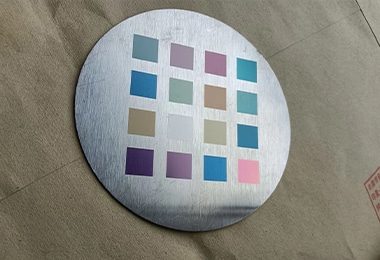
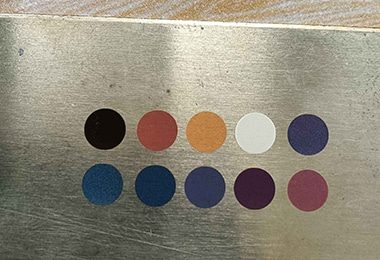
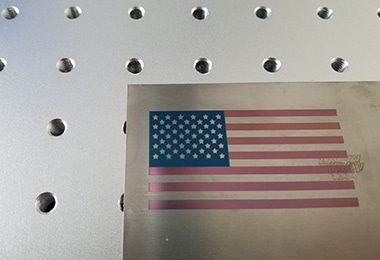
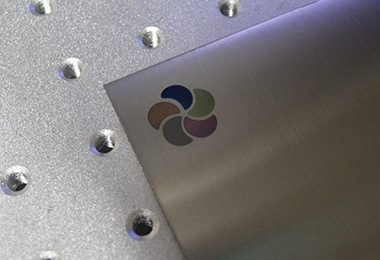
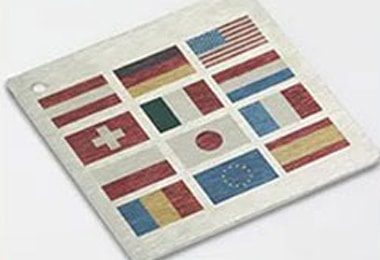
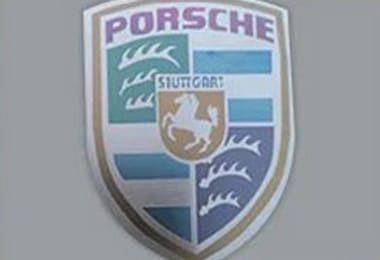
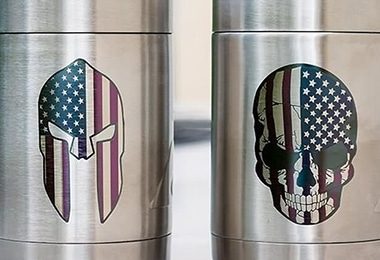
Comparison with Traditional Marking
| Comparison Item | Laser Marking | Dot Peen Marking | Inkjet Printing | Chemical Etching |
|---|---|---|---|---|
| Precision | High precision, capable of fine detail | Moderate precision, limited by machine setup | Moderate precision, depends on ink and surface | High precision, depending on the material |
| Speed | Fast, ideal for high-volume production | Slower than laser marking | Moderate speed, depends on material and setup | Slow due to the chemical process |
| Durability of Mark | Extremely durable, resistant to wear and corrosion | Durable, but may wear off over time | Temporary marks, easily smudged or faded | Durable, but can be affected by environmental factors |
| Material Compatibility | Works on metals, plastics, ceramics, and more | Works on metals and some plastics | Works on most materials, but not on metals easily | Works on metals, plastics, glass, and ceramics |
| Mark Type | Permanent marks, including text, logos, and images | Permanent marks, usually text or basic designs | Temporary marks, often used for product labeling | Permanent marks, usually text or logos |
| Surface Finish | Smooth, clean finish without residue | Leaves a small indentation or mark | Often leaves ink residue, can smear | Leaves a rough, etched finish |
| Cost of Equipment | High initial investment, low operating costs | Moderate cost for the machine | Low initial cost, but higher running costs (ink) | Moderate cost, ongoing chemical and safety costs |
| Maintenance | Low maintenance, requires minimal intervention | Requires more maintenance for mechanical parts | Moderate maintenance for print heads and ink refills | High maintenance, requires handling chemicals safely |
| Environmental Impact | Very low | Dust pollution | Produces chemical waste (ink cartridges, solvents) | Environmental hazards due to chemical use |
| Waste Generation | Minimal dust | Large abrasive waste | Small residue | Minimal |
| Consumables Required | None or minimal | Abrasive media | Dry ink or solvent cartridges | Process chemicals |
| Secondary Cleaning Needed | Rarely | Often | Sometimes | Rarely |
| Operating Cost | Low long-term | Medium | High cost per unit due to ink consumption | Low cost per unit, but chemical disposal adds cost |
| Initial Equipment Cost | Higher | Low | Medium | High |
| Automation Capability | Very high | Limited | Moderate | High |
| Cleaning Speed | Fast | Fast | Medium | Medium |
| Maintenance Requirements | Low | High due to wear | Moderate | Gas system maintenance |
| Safety Risk | Low with proper shielding | Dust inhalation risk | CO2 handling risk | High voltage/gas risk |
| Energy Consumption | Moderate electrical power | Compressed air required | CO2 pellet production | Electrical and gas power |
| Surface Preparation Quality | Excellent for welding/painting | Rough surface finish | Good | Highly activated surfaces |
| Suitable for Rust Removal | Excellent | Very effective | Limited | Limited |
| Suitable for Paint Removal | Excellent control | Effective but rough | Good | Limited |
| Industry Applications | Manufacturing, aerospace, restoration | Heavy industry, shipyards | Equipment maintenance | Semiconductor and electronics |
Why Choose AccTek Laser
Advanced Laser Technology
AccTek Laser integrates the latest advancements in laser marking technology to ensure high precision and consistent marking results. Our laser sources, combined with sophisticated control systems, offer exceptional beam quality and stability, enabling operators to produce high-contrast, durable marks on a variety of materials, including metals, plastics, and ceramics, with minimal surface damage.
Wide Range of Machine Options
AccTek Laser offers a diverse selection of laser marking machines, including fiber laser, CO2 laser, and UV laser models, with varying power levels and configurations to suit different marking needs. From compact desktop machines to large-scale industrial systems, we provide solutions for applications such as engraving, serial numbering, logo marking, and barcoding, ensuring the right fit for every industry.
High-Quality Components
AccTek Laser machines are constructed using only top-tier components sourced from trusted global suppliers. This includes durable laser sources, high-speed galvo scanners, and reliable control systems. These premium parts contribute to the overall stability, longevity, and performance of the machines, even under continuous, demanding industrial use.
Customization and Flexible Solutions
AccTek Laser provides customizable options to meet specific customer requirements. Whether it's adjusting the laser power, integrating rotary attachments for cylindrical objects, or adding automation systems, we offer flexible solutions that enhance productivity and operational efficiency. These customized solutions allow businesses to tailor the machines to their unique production processes.
Professional Technical Support
AccTek Laser offers comprehensive technical support throughout the entire lifecycle of the product. From machine selection and installation to operation training and troubleshooting, our expert team ensures that customers can fully leverage the capabilities of their laser marking machines. Our technical support helps minimize downtime and ensures that your operations run smoothly.
Reliable Global Service
AccTek Laser has a proven track record of serving customers across the globe. Our reliable international service network includes remote assistance, on-site support, and responsive after-sales services, ensuring that your machines are well-maintained and continue to operate at peak efficiency. We are committed to providing long-term support, maximizing uptime, and ensuring customer satisfaction worldwide.
Customer Reviews
Related Resources

How does the choice of laser type affect marking capabilities?
This article will provide a comprehensive overview of the characteristics, performance, and applicable scenarios of different laser types, helping you choose the most suitable laser marking solution for your specific

What Are the Advantages and Limitations of Laser Marking?
This article systematically analyzes the characteristics, advantages and disadvantages, and application scenarios of three marking technologies: fiber laser, CO2 laser, and UV laser, and provides some guidance for selecting a

What Are the Common Defects in Laser Marking?
This article introduces the application of laser marking technology, common defects, and solutions, and provides optimization measures to improve marking quality and efficiency.

How to Remove Laser Markings
This article focuses on the different methods of removing laser marks, including mechanical, chemical and thermal treatment, and provides safe and effective best practices guidance.
Frequently Asked Questions
How To Choose Appropriate MOPA Laser Marking Parameters?
- Understand Key Parameters: The main parameters include power, pulse frequency, pulse width, marking speed, and hatch spacing. Each one affects how energy is delivered to the material. Power controls overall energy, while pulse width and frequency determine how that energy is distributed over time.
- Adjust Pulse Width for Surface Effects: Pulse width is one of the biggest advantages of MOPA lasers. Short pulse widths are ideal for fine marking, minimal heat input, and color marking on metals like stainless steel. Longer pulse widths increase heat input, which is better for deep engraving or strong contrast but may cause more thermal effects.
- Set Frequency Based on Material Response: Higher frequencies produce smoother and more uniform marks, especially for surface marking and color effects. Lower frequencies deliver higher peak energy per pulse, making them suitable for deeper engraving or marking harder materials.
- Balance Power and Speed: Higher power increases marking efficiency and depth, but it must be balanced with speed. Faster speeds reduce heat buildup and prevent burning or deformation, while slower speeds increase energy absorption and marking depth. Finding the right combination is key to achieving consistent results.
- Control Hatch Spacing and Line Density: Hatch spacing determines how closely lines are placed during marking. Smaller spacing results in smoother and more uniform fills but increases processing time. Larger spacing speeds up marking but may reduce quality or consistency.
- Consider Material Type: Different materials respond differently to MOPA settings. For example, stainless steel can achieve color marking with specific combinations of low power, high frequency, and short pulse width. Aluminum often requires different settings to avoid surface damage or uneven results.
- Perform Testing and Optimization: There is no single set of parameters that works for all applications. Test runs on sample materials help identify optimal settings. Recording successful parameter combinations allows for repeatability in production.
- Avoid Excessive Heat Input: Too much energy can cause burning, oxidation, or surface damage. Proper parameter control helps maintain clean markings and protects the material.
What Are The Limitations Of MOPA Laser Marking Machines?
- Limited Material Compatibility: MOPA lasers are primarily designed for metals such as stainless steel, aluminum, and titanium. While they can mark some plastics, their performance on non-metal materials is limited compared to CO2 lasers. For applications involving wood, glass, or organic materials, other laser types are generally more suitable.
- Higher Initial Cost: Compared to standard fiber laser marking machines, MOPA systems are more expensive due to their advanced pulse control capabilities. This higher upfront investment may not be justified for basic marking tasks where standard fiber lasers can achieve similar results.
- Complex Parameter Adjustment: MOPA lasers offer more adjustable parameters, including pulse width and frequency, which increases flexibility but also complexity. Operators need more experience and testing to find optimal settings. Incorrect parameter combinations can lead to poor results, such as inconsistent colors or surface damage.
- Limited Deep Engraving Efficiency: While MOPA lasers can perform engraving, they are not always the most efficient choice for deep material removal. Continuous wave fiber lasers or higher-power systems may be more suitable for heavy engraving tasks, as MOPA systems are often optimized for surface marking and fine details.
- Sensitivity to Material Variations: Color marking, one of the key advantages of MOPA lasers, can be sensitive to slight variations in material composition or surface condition. Achieving consistent colors across different batches of material can be challenging and may require frequent parameter adjustments.
- Lower Speed for Specialized Applications: For applications like color marking or high-precision surface finishing, MOPA lasers may require slower processing speeds to achieve the desired effect. This can reduce productivity compared to standard marking processes.
- Cooling and Environmental Requirements: Although generally reliable, MOPA systems still require stable environmental conditions and proper cooling to maintain performance. Variations in temperature or dust levels can affect marking consistency.
- Not Ideal for Cutting Applications: MOPA laser marking machines are not designed for cutting or heavy material processing. Their primary function is marking and light engraving, limiting their use in applications that require material separation.
What Auxiliary Equipment Are Needed For MOPA Laser Marking Machines?
- Fume Extraction and Filtration Systems: One of the most important auxiliary devices is a fume extractor. MOPA laser marking, especially on metals or coated surfaces, can produce smoke and fine particles. A proper filtration system with HEPA and activated carbon filters removes harmful emissions, protects operators, and prevents residue buildup on optics.
- Workholding and Fixtures: Accurate positioning is essential for consistent marking. Fixtures and clamping systems hold parts securely in place, ensuring repeatability. Custom fixtures are often used in production environments to match specific product shapes and improve efficiency.
- Rotary Attachments: For marking cylindrical or curved objects such as pipes, rings, or bottles, rotary devices are required. These attachments synchronize with the laser marking system to enable precise marking on round surfaces.
- Focus Adjustment Systems: Manual or automatic focusing systems help maintain the correct focal distance between the laser head and the workpiece. Autofocus features are particularly useful in high-volume or automated applications, ensuring consistent marking quality.
- Cooling and Ventilation Support: Although MOPA laser marking systems are typically air-cooled, proper ventilation around the machine is still necessary. Cooling fans and airflow systems help maintain stable operating temperatures and prevent overheating.
- Air Compressor or Air Assist (If Needed): In some applications, an air assist system is used to blow away dust and debris from the marking area. This improves marking clarity and keeps the working surface clean.
- Control Computer and Software: A dedicated computer with compatible marking software (such as EZCAD) is required to operate the machine. This system manages design input, parameter settings, and process control.
- Power Stabilizer or UPS: A stable power supply is important for protecting sensitive electronics. Voltage stabilizers or uninterruptible power supplies (UPS) help prevent damage from power fluctuations or outages.
- Safety Equipment: Protective enclosures, safety interlocks, and laser safety eyewear are essential to ensure operator safety during operation.
What Are The Environmental Requirements For MOPA Laser Marking Machines?
- Temperature Control: MOPA laser marking machines typically operate best within a temperature range of 10℃ to 35℃ (50℉–95℉). Excessive heat can affect laser stability and shorten component lifespan, while very low temperatures may impact electronic performance. A consistent, climate-controlled environment helps maintain marking precision.
- Humidity Levels: Relative humidity should generally be maintained between 30% and 70%. High humidity can lead to condensation on optical and electronic components, increasing the risk of damage or malfunction. Very low humidity may cause static electricity buildup, which can interfere with sensitive electronics.
- Clean and Dust-Free Environment: Dust and airborne particles can accumulate on lenses, galvo systems, and internal components, reducing marking quality and potentially causing damage. Operating in a clean environment or using dust control measures helps ensure stable performance and reduces maintenance frequency.
- Proper Ventilation and Fume Control: Although MOPA lasers are used mainly for metals, marking can still generate fumes, especially on coated or treated surfaces. Adequate ventilation or a dedicated fume extraction system is necessary to remove particles and maintain air quality. This also prevents residue from settling on optics.
- Stable Power Supply: A consistent electrical supply is essential. Voltage fluctuations or sudden power interruptions can damage internal components or disrupt operation. Using a voltage stabilizer or uninterruptible power supply (UPS) helps protect the machine.
- Vibration-Free Installation: The machine should be placed on a stable, level surface away from heavy machinery or sources of vibration. Excessive vibration can affect marking accuracy, especially for fine details or high-precision work.
- Adequate Space and Accessibility: Ensure there is sufficient space around the machine for ventilation, maintenance, and safe operation. Easy access to components simplifies routine checks and servicing.
- Lighting Conditions: Good ambient lighting helps operators position parts accurately and inspect marking results, especially for detailed or small-scale work.
What Training Is Required To Operate MOPA Laser Marking Machines?
- Understanding MOPA Laser Principles: Operators must first understand how MOPA technology works, particularly the role of adjustable pulse width and frequency. These parameters directly affect marking effects such as color marking, contrast, and surface finish. A solid grasp of how energy interacts with different metals is essential.
- Parameter Adjustment Skills: Unlike basic systems, MOPA lasers require precise tuning of multiple parameters, including power, speed, frequency, pulse width, and hatch spacing. Training should focus on how to combine these settings to achieve specific results, such as color marking on stainless steel or clean marking on anodized aluminum.
- Machine Operation Training: Operators need hands-on experience with machine startup, shutdown, focusing, and positioning workpieces. They should also learn how to manage marking jobs, adjust settings, and monitor performance during operation.
- Software and Design Knowledge: MOPA laser marking systems typically use software such as EZCAD. Operators must learn how to import vector and image files, create text and barcodes, and manage layers for different marking parameters. Familiarity with design tools like CorelDRAW or Adobe Illustrator helps prepare files.
- Material Knowledge: Different metals respond differently to MOPA laser settings. Training should include understanding how materials like stainless steel, aluminum, and titanium behave under varying parameters. This is especially important for achieving consistent color marking.
- Safety Training: Operators must be trained in laser safety, including proper use of protective eyewear, awareness of laser radiation hazards, and safe handling of materials. Knowledge of emergency procedures and machine safety features is essential.
- Quality Control and Troubleshooting: Training should cover how to identify issues such as uneven color, poor contrast, or surface damage. Operators must learn how to adjust parameters and correct problems efficiently.
- Basic Maintenance Awareness: Operators should understand routine maintenance tasks such as cleaning lenses, checking ventilation systems, and ensuring stable operation.
- Advanced Application Training (Optional): For specialized tasks like color marking or high-precision engraving, additional training may be required to master complex parameter combinations.
What PPE Is Required To Operate MOPA Laser Marking Machines?
- Laser Safety Eyewear: The most critical PPE is laser safety glasses designed for the specific wavelength of the MOPA fiber laser (typically around 1064 nm). These glasses protect the eyes from direct and reflected laser beams, which can cause serious and permanent damage. Standard safety glasses are not sufficient.
- Protective Clothing: Operators should wear non-flammable, long-sleeved clothing to protect against incidental exposure to heat or reflected energy. While MOPA marking produces less heat than cutting or welding, protective clothing adds an extra layer of safety, especially in industrial environments.
- Gloves (When Handling Materials): Protective gloves are recommended when handling parts before and after marking. Marked materials may be hot or have sharp edges. Gloves should provide heat resistance and allow enough dexterity for precise handling.
- Respiratory Protection: Laser marking on metals, especially coated or treated surfaces, can produce fumes and fine particles. If fume extraction systems are insufficient or during maintenance, operators should use masks or respirators with appropriate filters to avoid inhalation of harmful substances.
- Safety Footwear: In industrial settings, safety shoes with reinforced toes help protect against falling objects or sharp materials. Slip-resistant soles also improve stability around machinery.
- Face Protection (If Required): For open or partially enclosed systems, a face shield may be used in addition to laser eyewear. This provides extra protection against reflected light or airborne particles.
- Hearing Protection: MOPA laser marking machines are generally quiet, but supporting equipment such as ventilation systems may generate noise. Hearing protection may be necessary in certain environments.
- Additional Safety Considerations: PPE should always be used alongside built-in safety features such as enclosures, interlocks, and ventilation systems. Proper operator training ensures that PPE is used correctly and consistently.
What Is The Lifespan of MOPA Laser Marking Machines?
- Laser Source Lifespan: The core of MOPA laser marking machines is its fiber laser source. High-quality MOPA laser sources typically have a lifespan of 50,000 to 100,000 operating hours. This means the machine can run for many years, even under continuous production. Compared to traditional laser marking systems, MOPA lasers have fewer wear components, which contributes to their longevity.
- Galvanometer (Galvo) System: The galvanometer (Galvo) scanning system, responsible for directing the laser beam, usually lasts 8 to 10 years or more with proper use. High-quality galvo components maintain precision and stability over time, which is critical for detailed marking tasks.
- Optical Components and Consumables: Protective lenses and other optical elements may require periodic cleaning or replacement. These are relatively low-cost consumables, and their lifespan depends on the working environment and the material being processed. Keeping optics clean helps maintain consistent marking quality.
- Cooling and Electrical Systems: MOPA laser marking machines are typically air-cooled, which simplifies maintenance. Cooling fans, power supplies, and control systems can last many years if operated in a stable environment. Proper ventilation helps prevent overheating and extends component life.
- Operating Environment: Environmental conditions play a major role in lifespan. Clean, dust-free environments with stable temperature and humidity help protect sensitive components. Harsh conditions, such as excessive dust or unstable power supply, can shorten the machine’s service life.
- Maintenance Practices: Routine maintenance, including cleaning optics, checking connections, and ensuring proper airflow, helps prevent performance issues and extends lifespan. MOPA systems generally require less maintenance than many other laser technologies.
- Practical vs. Technological Lifespan: While the machine may physically last 8–15 years or more, some users upgrade earlier to take advantage of improved features, faster speeds, or enhanced automation.
How To Maintain MOPA Laser Marking Machines?
- Clean Optical Components Regularly: The protective lens and marking head must be kept clean to maintain beam quality. Dust, metal particles, or smoke residue can reduce marking clarity and damage optics over time. Use proper cleaning tools and follow recommended procedures to avoid scratching or contamination.
- Maintain Clean Working Environments: Operating in a clean, dust-free environment reduces the risk of contamination inside the machine. Metal marking can produce fine particles, so keeping the workspace clean helps protect both the optics and internal components.
- Check Ventilation and Fume Extraction: Ensure that fume extraction systems are working efficiently. Clean or replace filters regularly to maintain proper airflow. Poor ventilation can lead to residue buildup inside the machine and affect performance.
- Monitor Cooling and Airflow: MOPA laser marking machines are typically air-cooled. Check that cooling fans and vents are unobstructed and functioning properly. Overheating can reduce system stability and shorten component life.
- Inspect Electrical Connections: Regularly check cables, connectors, and power supplies for wear or looseness. A stable electrical system is important for consistent laser output and preventing unexpected shutdowns.
- Check the Galvo System: The galvanometer system controls beam movement and precision. Listen for unusual noise, and monitor marking accuracy. Periodic calibration may be required to maintain consistent results.
- Update Software and Backup Data: Keep the control software up to date and back up marking files and parameter settings. This ensures smooth operation and reduces the risk of data loss or compatibility issues.
- Avoid Overloading the Machine: Operate the machine within recommended parameters. Continuous high-power operation without adequate cooling or rest periods can lead to premature wear.
- Perform Routine Inspections: Regular inspections help identify potential issues early. Check alignment, marking consistency, and overall system performance to prevent unexpected downtime.
- Follow Manufacturer Maintenance Guidelines: Always follow the recommended maintenance schedule provided by the manufacturer. Timely servicing and part replacement help ensure long-term reliability.